Find your way around SEOgenz
What each part of SEOgenz is for: the feed, Explore, people, businesses, articles, communities, tools and jobs.
Updated 2 October 2026
SEOgenz brings together a professional network and a set of directories for the SEO industry. The main menu is on the left on larger screens, and at the bottom of the screen on phones.
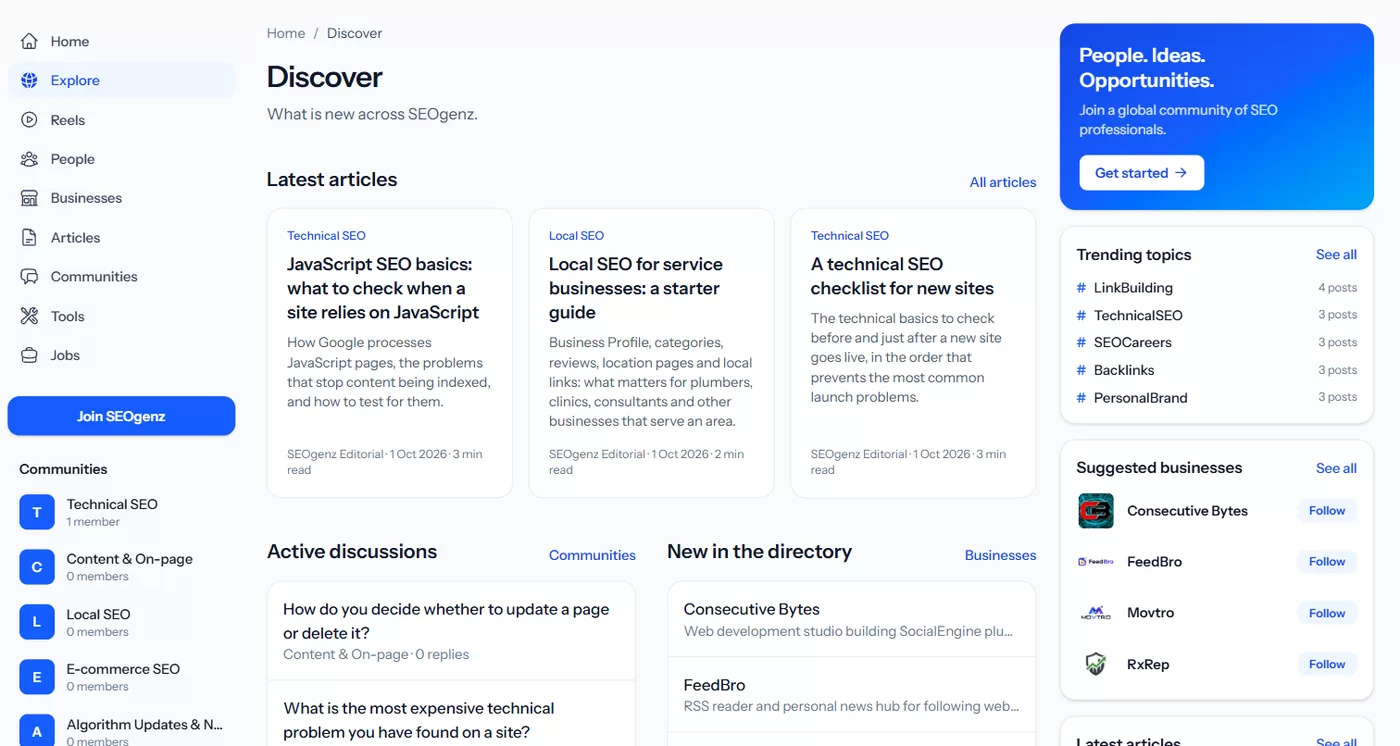 Explore: the main menu on the left, and what is new across SEOgenz.
The main sections
- Home: your feed, with posts from people and businesses you follow. Tabs let you switch between posts for you, people you follow, SEO news and trending posts.
- Explore: what is new across the site: latest articles, active discussions and new listings.
- Reels: short videos shared by members, from YouTube, TikTok or Instagram.
- People: SEO professionals with complete public profiles.
- Businesses: a directory of SEO agencies, consultants and marketing businesses.
- Articles: practical guides, reviewed before they are published.
- Communities: topic-based discussions, from technical SEO to careers.
- Tools: a directory of SEO tools with pricing details.
- Jobs: SEO jobs, freelance projects and opportunities.
Search
The search box at the top looks through people, articles, discussions, businesses, tools, jobs, communities and this help centre. Results are grouped by type; select a type to see more results of that kind.
Light, dark or system theme
Open your account menu (your photo, top right) and pick the sun for light, the moon for dark, or the screen icon to follow your device's setting. If you are not signed in, use the moon or sun button in the top bar. You can also change it in Settings → Account → Appearance. The choice is saved in your browser.